WebDev Workshop
Introduction To Web Programming [github]
Getting Started
1.1 Text Editor
I would recommend downloading Sublime Text or Notepad++
1.2 Domain & Hosting
'Your default web hosting account is created automatically the first time you login to https://web.engr.illinois.edu. As long as you have an active EWS account, you will have an active web hosting account as well' — Engineering IT ServicesYour default URL will follow this format 'netid.web.engr.illinois.edu' If you had a web.engr.illinois.edu web hosting account prior to the fall 2015 semester, your URL will be http://web.engr.illinois.edu/~netid.
1.2.1 What if I don't have an EWS account?
Check out this tutorial by Treehouse 'Using GitHub Pages To Host Your Website' (also use may as well use your illinois.edu email address to get the Github Student Developer Pack while you're at it).
HTML
2.1 Overview
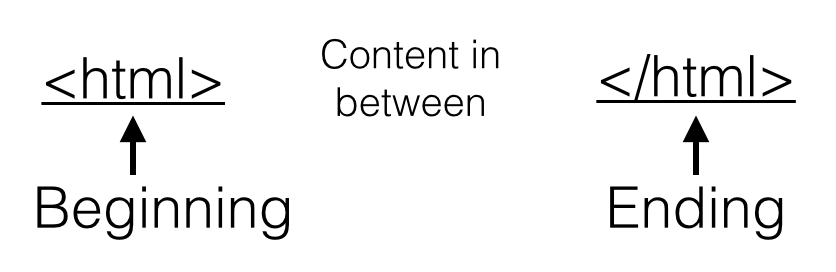
HTML is a markup language that is used to divide and group the content meaningfully on a web page. Web browers then render the content into visible pages. HTML uses tags, denoted by open and closing brackets, to mark the beginning and ending of segments as seen in the image below. Most all HTML elements have an ending tags (with a few exceptions).
Spaces in an html file aren't interpreted as you might think so be aware that extra spaces don't really change how the browser formats the text. It's important to note that the visual organization and formatting of the HTML elements should be done with CSS, which by convention should be the only way items are styled. That being said, people still use things like: '<br>' (to insert line breaks) and ' ' (to insert the space of a ordinary character).
2.2 Common HTML Tags
<!DOCTYPE html>
<html>
<head><title>ProjectTitle</title></head>
<body>
 <p>
   <h1>Meh.</h1>
   <h2>Meh.</h2>
   <h3>Meh.</h3>
   <h4>Meh.</h4>
   <h5>Meh.</h5>
   <h6>Meh.</h6>

   <i>italicized text</i><br>
   <b>bolded text</b><br>

   <a href ="http://goo.gl/HXu6YM">link to image</a><br>
   <img src ="http://goo.gl/HXu6YM" width="200" height="200">
 </p>
 <div>
 <ol>
   <li>ordered list item1</li>
   <li>ordered list item2</li>
   <li>ordered list item3</li>
 </ol>
 </div>
</body>
</html>
So How Can I Create an HTML file?
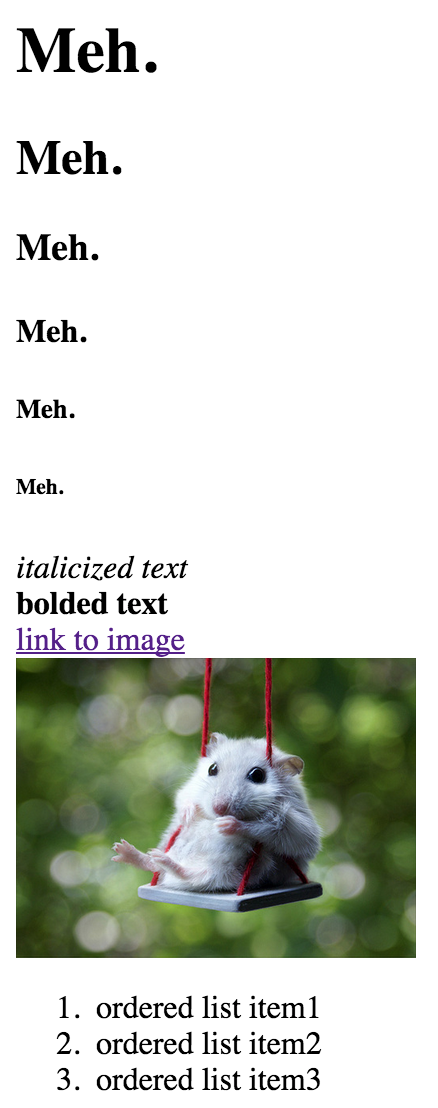
Try copying the code above entitled "index.html" into a text editor of your choice. Save the file as anything you choose, just be sure ".html" is the file's extension. Then go ahead and click on the file and it should display like the image to the right.
2.3 Defining Classes and Ids
HTML is the basis from which css then implements stylings. But how does css know which elements to style how? Initially this can be done through use of the html tags themselves (ie. p, div, h1, h2, etc.) Things soon get difficult when you want to style multiple p elements differently.Hence the need for classes and ids arises.
Classes are indicated in the .html file with a class = "ArbitraryClassName" statement which is added directly into the tag of an html element. Multiple html elements can be defined with the same class as a means of grouping their stylings together.
Ids are similar to classes in that they're defined in .html files with a id = "ArbitraryIdName" statement inside the html tag itself. Ids on the other hand can only be define once. Meaning that only one html element can have a single id.

CSS
3.1 Overview
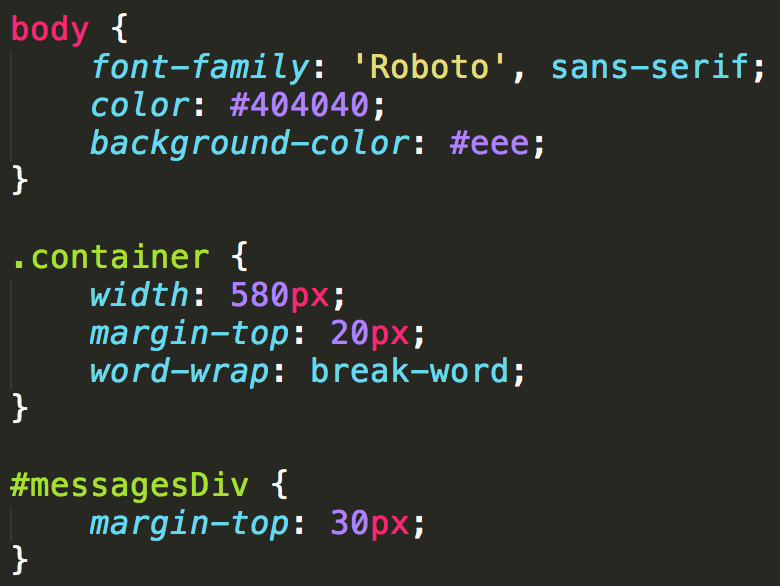
Once the core page content has been decided upon and the HTML has been hashed out we'll use cascading style sheets (css) to make it pretty. Although CSS can be included in the header tag of any html file, the best practice is to put it into a file of it's own and include it using something like:
<link rel="stylesheet" type="text/css" href="style.css">CSS allows you to select or group html elements and specify things like: margins/padding, backgrounds, colors, text sizes, fonts, alignment, etc. It's a great way to make different pages on a site look uniform.
3.2 Selectors
So we know how html tags, classes and ids are used to uniquely define a set of elements to style within the html but how should we go about selecting items to style from the css point of view?
We've established three primary ways of selecting elements and in the css file here is a generic approach to how we select them: by html tag type (ie. <p> paragraphs, <div> divisions, <h1> headers, etc.), by class (class is identified inside an html tag) and by id.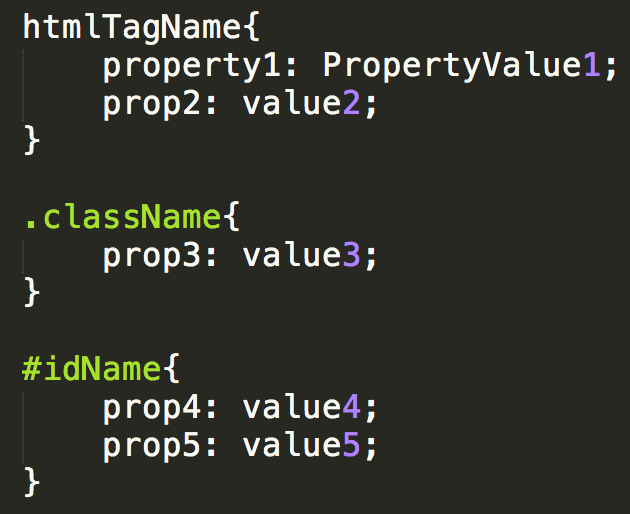
3.3 The Notion of Priority
With more involved websites, the css can become cluttered and when you're integrating frameworks like bootstrap (that have predefined css stylings) sometimes you'll have collisions. By collision I mean the situation where there are two identical directives that are assigned different values leading to a conflict. In this case the actual style is determine by which styling is of the highest priority. Below is a list in order of decreasing priority.
- Inline
<img src = "#" width="400" height="300">
- Internal
"index.html" <!DOCTYPE html> <html> <head> <style> p { background-color: white; opacity: 0.8; width: 750px; } body{ position: relative; /* required */ } .breadcrumb{ text-align: center; } </style> </head> <body> </body> </html> - External
"style.css"

  p {
        background-color: white;
        opacity: 0.8;
        width: 750px;
    }

    body{
        position: relative; /* required */
    }

    .breadcrumb{
        text-align: center;
    }
Bootstrap
Bootstrap is a open-source front end framework that provide a uniform and modern way of formatting and organizing elements with less overhead. Bootstrap also has JavaScript components (jQuery plugins) that make interfaces more interactive and dynamic.
The framework has a whole list of components including: navigation bars, carousels, buttons, labels, badges, panels, banners, thumbnails, etc.
Other features include the ability for a single site to accomodate for various screen sized.
4.1 How To Start Using Bootstrap
One way is to go to go ahead and download things off the Bootstrap site, but the fastest way to get started is by including a link to the minified CSS, Javascript, and jQuery files in the header of your html in addition to any other custom files you have to include,
<link rel="stylesheet" href="https://maxcdn.bootstrapcdn.com/bootstrap/3.3.5/css/bootstrap.min.css">
<link rel="stylesheet" href="https://maxcdn.bootstrapcdn.com/bootstrap/3.3.5/css/bootstrap-theme.min.css">
<script src="https://ajax.googleapis.com/ajax/libs/jquery/1.11.3/jquery.min.js">
<script src="https://maxcdn.bootstrapcdn.com/bootstrap/3.3.5/js/bootstrap.min.js">
Additional Resources & References
HTML, CSS guides & tutorials W3Schools